
Bridge Between Chains
Bridging moves native funds between your activated chains without leaving print.world — from your Solana wallet to your wallet on another chain, or back to Solana when you want to trade there. No external bridge sites, no manual address copying between chains.
How to Bridge Funds
Section titled “How to Bridge Funds”-
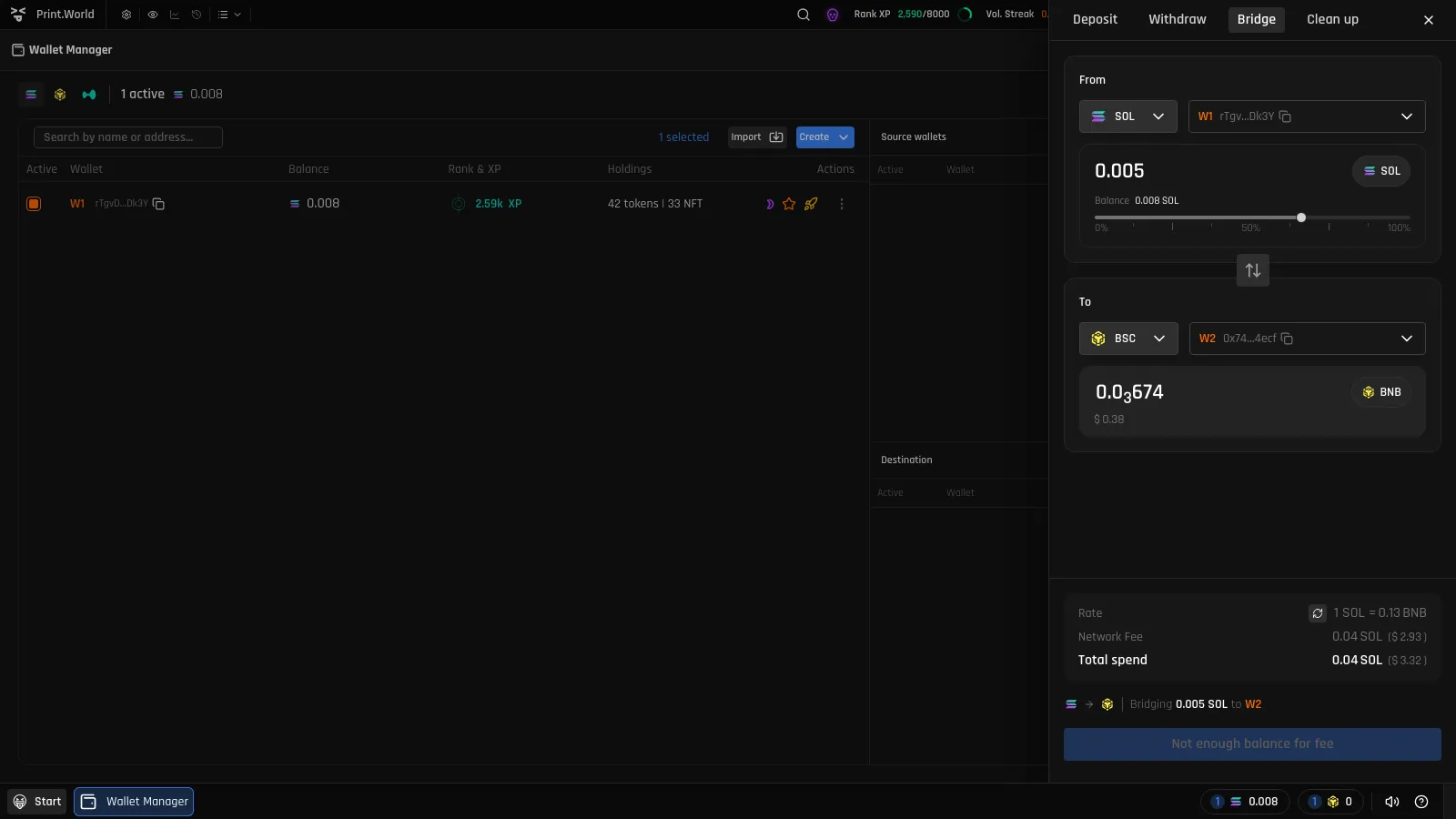
Open the Bridge tab. Open the wallet balance popover and press Bridge, or switch to the Bridge tab in the wallet drawer.
-
Choose the direction. Pick the source and destination chains. Use the switch button to flip the direction instantly.
-
Enter the amount. Type an amount or press Max. The quote updates to show what you’ll receive on the destination chain, along with its USD value. If the amount exceeds your balance, the form tells you before you can confirm.
-
Confirm and wait. Once confirmed, a progress bar with a countdown tracks the transfer until it reaches “Finalizing…”. Bridges typically complete within a few minutes, and your destination-chain balance updates automatically when done.
Good to Know
Section titled “Good to Know”- Bridging moves the native token of each chain between your own wallets — to send funds to an external address, use Withdraw.
- If the destination chain isn’t activated yet, activate it first — see the Overview for how chain activation works.
- Quotes reflect the current bridge rate; the exact received amount is shown before you confirm.